Unified chat panel for multi-platform stream viewing and moderation
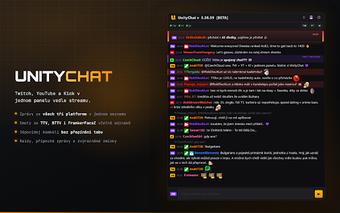
UnityChat, developed by Jouki, is a Chrome extension that unifies live chat for stream viewers and moderators into a single side panel. It aggregates Twitch IRC, YouTube Live Chat API, and Kick Pusher WebSocket so users can read and reply without switching tabs. The extension renders 7TV, BTTV, and FFZ emotes, shows native platform badges, and offers a unified input field. It targets viewers, moderators, and creators who follow multiple broadcasts and need a single interface to manage chat presence.
What UnityChat does for multi-platform viewing
UnityChat consolidates separate chats into one feed by merging Twitch, YouTube, and Kick messages into a single chronological panel, reducing the need to juggle browser tabs. The extension shows platform badges next to usernames and highlights first-time chatters, which helps moderators keep contextual cues while watching a broadcast. Users open the side panel from the browser toolbar to access the combined stream conversations.
How it handles input, emotes, and high-rate chats
Messaging and emote support aim to preserve cross-platform expression with a unified input field that sends messages to any connected platform and automatic reply context propagation. The extension renders 7TV, BTTV, and FFZ emotes across feeds and includes tab-autocomplete for typing speed. An auto-scroll pause option helps manage high-velocity chats so the panel does not jump during active moments.
Privacy posture and project transparency
Privacy is explicit and verifiable; the project is open-source and the developer documents a no-tracking policy with no telemetry, allowing audits of the codebase. That policy specifically addresses data collection concerns for users who moderate or engage across services. The extension’s source is maintained publicly, which supports independent inspection of network activity and permission use.
Practical choice for multi-stream engagement with a privacy focus
UnityChat is a pragmatic option for viewers and moderators who need a single place to follow and participate in multiple live chats while avoiding tab switching. Its open-source, no-tracking stance suits users concerned about telemetry. Expect a trade-off in managing a dense unified feed during peak chat activity; the extension helps, but heavy moderation workflows may still require platform-specific tools outside the panel.